← All work
Case Study 02 / 2024–2025 · B2B SaaS · Template library

Cutting time-to-first-page by giving the template library a backbone.

Instapage had hundreds of templates, but most users still started from a blank page because the template library was difficult to navigate and overwhelming to browse. I led the redesign of the template selection experience end-to-end, focusing on improving discoverability and reducing decision friction. After launch, the average template selection time decreased from 10–15 minutes to 3–5 minutes.

RoleLead Product Designer
End-to-end
IndustryB2B SaaS
Instapage
TeamPM, core eng team,
marketing site team
DurationDiscovery → ship
(Phase 1)
Outcome10–15 min → 3–5 min
time spent selecting a template
Note

Published with written permission from airSlate (May 2026). Customer screenshots, employee names, and any personally identifying information have been omitted under the terms of the permission.

Quick read · 30 seconds

The whole case, in six lines.

The problem

~10% of created pages started from a template; ~90% came from a blank canvas. The catalog existed but didn't function as a starting point.

The diagnosis

No way to filter or narrow the catalog. Users scanned a flat grid of generic thumbnails, gave up, and started from blank — the slowest possible path.

The intervention

A five-axis filter taxonomy (Industry, Use Case, Page Type, Color, Style) with explicit OR/AND query logic, applied tags, and a curated set of new layouts.

The trade-off

Search, sorting, and live template count were postponed to future iterations — partly technical (infrastructure wasn't ready), partly to force focus on filter quality first. A good taxonomy beats a search bar over a bad catalog.

The result

Time spent selecting a template fell from 10–15 min to 3–5 min (sampled from 10 random session recordings, post-launch). Template-led creation moved from long tail to default path.

My role

Lead Product Designer, end-to-end: research, IA, filter logic, flows, high-fidelity, marketing-site sync, admin tooling for the curation team.

At a glance
Baseline ratio
~1:9
template-led vs blank-canvas pages, pre-launch
Filter axes
5
Industry · Use Case · Page Type · Color · Style
Catalog size
294
templates curated and tagged for the relaunch
Selection time
3–5 min
post-launch (was 10–15 min) — sampled from 10 random session recordings
01 · Context

Templates were the entry path the product didn't have.

This project was part of a broader company initiative focused on improving the trial experience and making templates a more central part of the product journey.

I owned Phase 1 end-to-end: redesigning the in-app template catalog and aligning it with the marketing website experience, so users would see the same templates before and after signup.

The challenge was that template adoption was extremely low. Even though Instapage had hundreds of templates available, most users ignored them and started from a blank page instead. Only around 1 in 10 pages was created from a template.

Before expanding the template ecosystem further, we first needed to solve the core UX problem: users struggled to discover, compare, and confidently choose templates inside the product.

Strategic frame

Phase 1 wasn't about volume. It was about turning templates from a feature buried in the editor into the system the rest of the funnel could rely on.

02 · Problem

A flat grid of generic thumbnails is not a library — it's a wall.

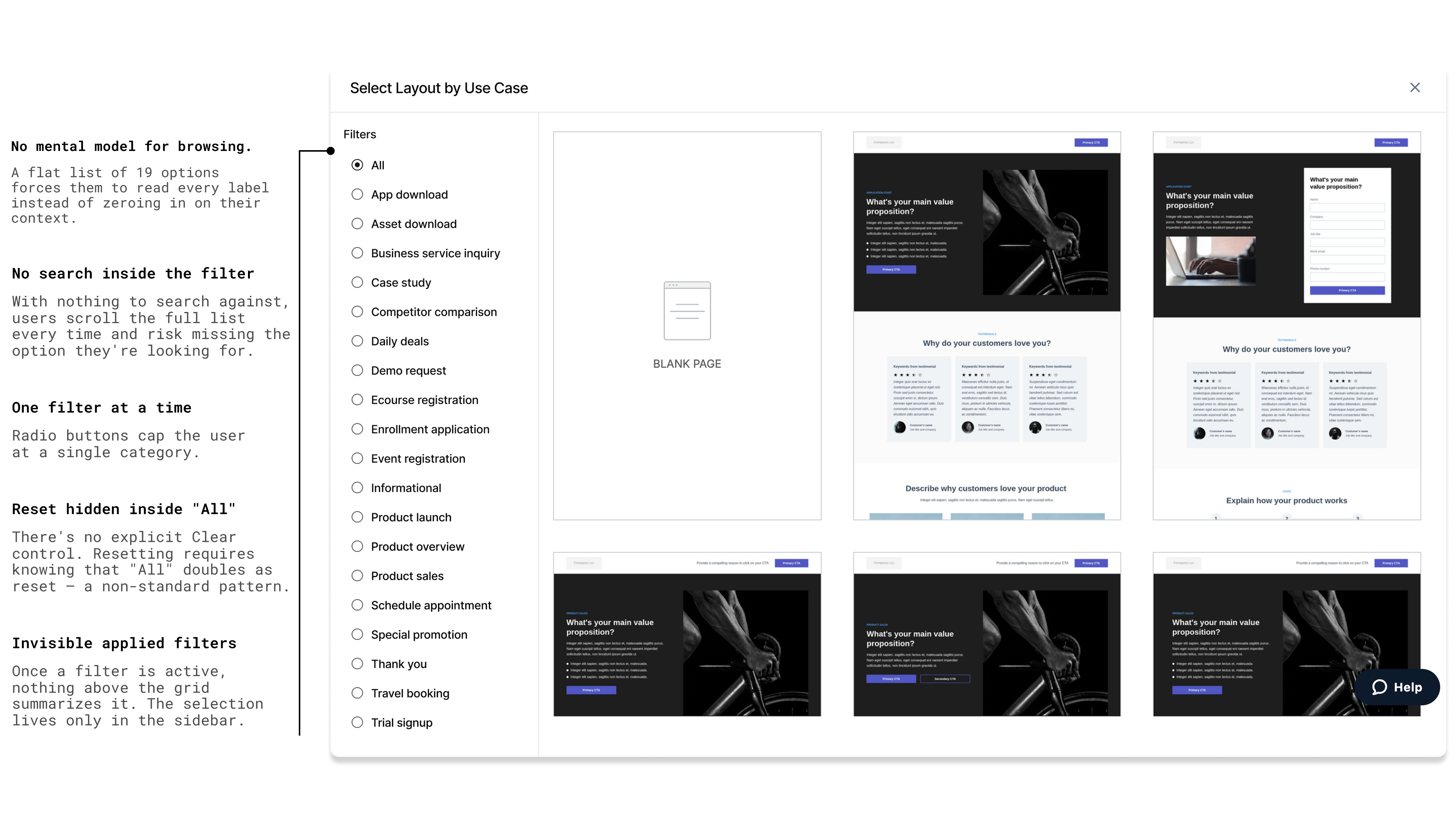
I started by treating the existing catalog like an unknown product and walked through the new-user flow myself. The story was the same every time: land on the layouts page, see ~80 thumbnails arranged with no apparent logic, scroll, scroll again, fail to spot anything that fits, click "blank page" instead. There was nothing wrong with the templates individually — the system around them gave the user no purchase.

The original template library: a flat grid of thumbnails with no filters, no grouping, no visible ordering logic — just a wall of layouts
Fig. 00 The original layouts page — a flat grid of thumbnails with no filters, no grouping, no visible ordering logic.

Three structural issues compounded:

  • No mental model for browsing. Templates weren't grouped by anything a user would think in — industry, page type, what they were trying to do. The implicit categorisation was internal naming, which leaked through to UI.
  • No way to narrow. Users couldn't say "show me only e-commerce product pages in dark themes." They had to eyeball the grid until something matched, then hope.
  • Templates looked similar to each other. The catalog had accumulated over years and many layouts converged on the same visual register — without strong differentiation across use cases, users couldn't tell what each template was actually for. Decision-making became elimination by feeling, not by fit.
  • Inconsistent template quality. Some templates were modern and on-brand; others were aged and off-tone. Without curation, the bad ones poisoned trust in the good ones.

The blank-canvas escape hatch was the predictable consequence — and the slowest possible path for a new user. An empty page editor is the worst onboarding in landing-page software: every decision has to be made from scratch, in a tool the user is still learning.

Insight

Users weren't choosing blank canvas because they preferred it — they were choosing it because it was the only path they could navigate. The library wasn't broken. It was unindexed.

03 · Approach

Structure before visuals.

We intentionally started with the filtering structure before redesigning the catalog UI. Instead of focusing on thumbnails or visual polish first, we focused on how templates were organized and discovered. The goal was to make the existing library feel easier to navigate and more relevant — without simply adding more templates.

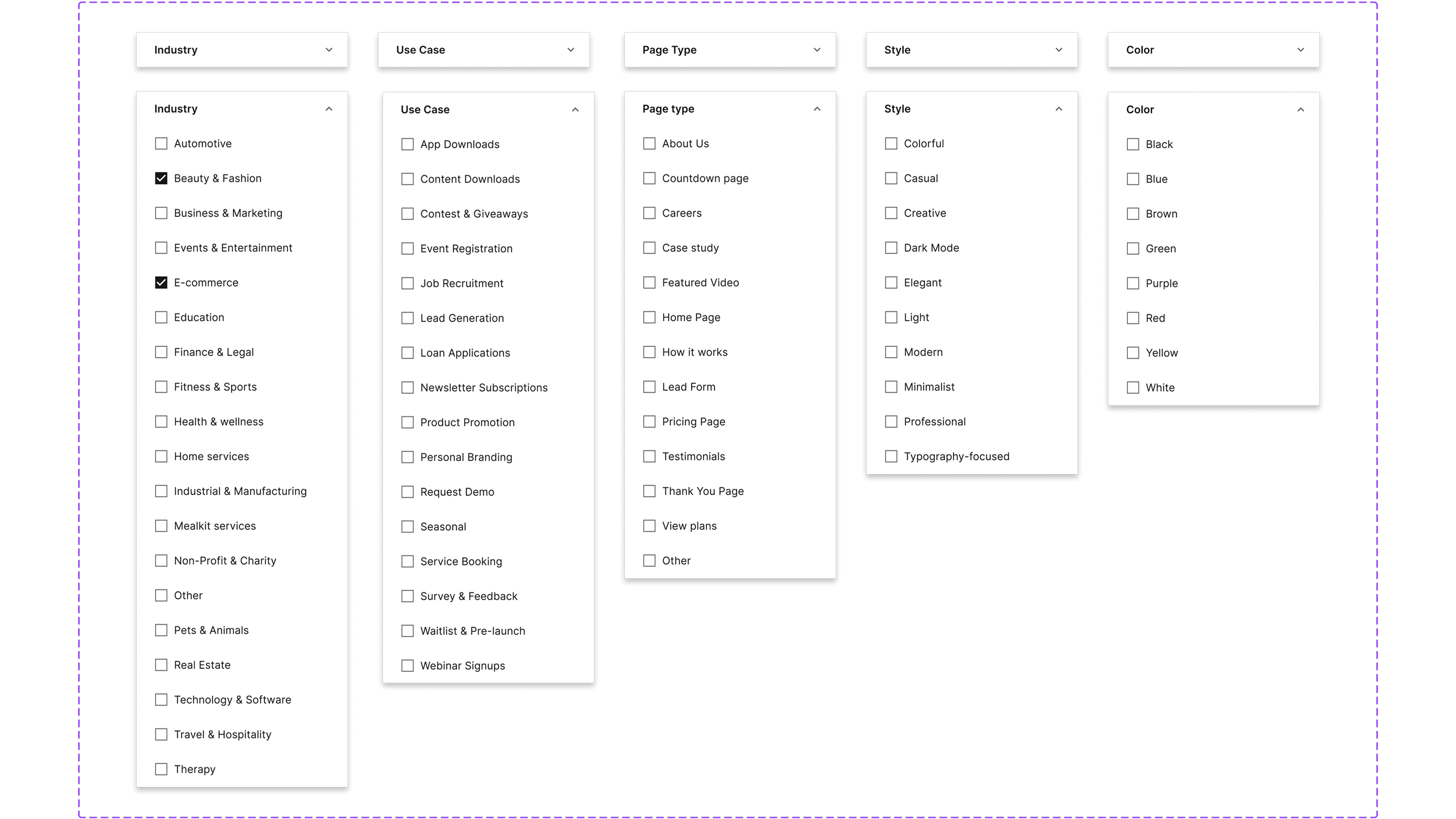
Together with the PM and engineering lead, I helped define a clearer filtering system with five filter categories that users could combine naturally while browsing:

Axis 01
Industry
E-commerce, SaaS, healthcare, education, real estate, services…
Axis 02
Use Case
Lead gen, webinar registration, product launch, app download, event…
Axis 03
Page Type
Landing page, click-through, thank-you, coming soon, long-form…
Axis 04
Color
A visual filter — useful when users have a brand palette in mind and almost nothing else.
Axis 05
Style
Aesthetic register — minimal, bold, editorial, playful — for users who think in vibe before category.

Two simple rules made the system work — and I asked the team to write them down explicitly, because filter behavior is where good catalogs quietly fail:

OR

Within a single category

If a user picks more than one Industry, show templates that match any of them. (Showing only templates tagged with both would usually return nothing.)

Industry: E-commerce or Automotive →
show all e-commerce or automotive templates
AND

Across categories

Combine filters from different categories to narrow the results — show only templates that match both.

Industry: E-commerce and Color: Black →
show only e-commerce and black templates

In parallel with the filter taxonomy, I collaborated with our Professional Services team to refresh the template library itself — the team that helps customers with custom solutions, page design, onboarding, and implementation, so they know what real customers actually use templates for. The catalog had accumulated over years; many templates were aged and visually similar to each other. Together we curated the existing set down, then added a new layer of visually distinct templates with stronger differentiation across use cases. A good filtering system on top of a stale catalog would only solve half the problem.

Three things stayed out of scope for Phase 1: search functionality, sorting, and a live template count. The constraints were partly real — the search infrastructure wasn't ready and the live-count required event tracking we hadn't built — and partly by design choice. I wanted the taxonomy to carry the catalog on its own before we earned the right to layer search on top. If users were finding the right template through a search bar, we'd never know whether the filters worked.

Decision

Postponing search was partly forced, partly chosen. Either way, it was the right call: the filtering system had to carry the catalog on its own before search could be added on top.

04 · Flow

Five steps from "I want a page" to "I'm editing one."

Filtering happens upfront — users narrow the catalog before opening any individual template, so every preview is a deliberate commit rather than a guess. The flow works the same way for new and existing users.

01
Land
User arrives on the templates page (web or in-app).
02
Filter
Applies one or more filter axes; tags appear at top, grid narrows live.
03
Preview
Opens a template to see it at full fidelity before committing.
04
Use
Clicks "Use template." Triggers signup if anonymous, otherwise straight through.
05
Edit
Lands in the builder with the template loaded — first-page-editing has begun.
Why this matters

The old flow had two doors: "use a template" (hard) or "blank page" (easy). The new one has one door, with templates on the other side of it. The blank canvas still exists, but it's no longer the path of least resistance.

05 · Hypothesis & targets

What we said the new library should do.

The PRD framed three nested hypotheses, each with a metric we could read post-launch.

  • Hypothesis 1 (this case): a curated, filterable catalog inside the product will increase the ratio of template-led page creation versus blank-canvas creation.
  • Hypothesis 2: a synced marketing-site catalog will increase trial CVR — because prospects can see what they'd be building before they sign up.
  • Hypothesis 3: better template-led pages convert better — increasing paid CVR downstream.

Phase 1 owned the first hypothesis. The numbers below show the documented baseline ratio (template:blank = ~0.1, i.e. 10:90) and the post-launch target:

Template-led page creation — target vs baseline

Pre-launch baseline~10% of created pages started from a template
~10%~1:9 ratio
PRD target~40% of created pages start from a template
~40%~4:6 ratio
Estimated post-launchshape derived from internal Segment events
~35%~3.5:6.5 ratio
Estimated ~3.5× lift in the template-led share of page creation versus baseline. The harder-to-fake number: time spent selecting a template fell from 10–15 minutes to 3–5 minutes in a small qualitative sample of 10 random session recordings post-launch — see Outcome below.
06 · Design decisions

What I argued for — and what I argued against.

The interesting design conversations on a project like this are rarely about the visible UI. They're about the constraints — what gets cut, what gets simplified, what gets refused. Four of those calls shaped Phase 1.

What I pushed back on

  • Adding search too early. We decided not to introduce search in Phase 1. First, we wanted to validate whether the new filtering system was strong enough on its own. Search was also technically out of scope at the time, so we focused on improving discovery through better structure and navigation first.
  • Sorting by popularity. We avoided a popularity-based sorting system because it would continue promoting the same small group of already popular templates, while making the rest of the catalog even less discoverable.
  • Adding more filter complexity immediately. We intentionally kept the filtering structure simple in the first iteration. Adding deeper levels of categorization too early would have increased maintenance complexity before validating that the new system actually worked for users.
  • Keeping all old templates alongside new ones. We also reduced and curated the existing template library before introducing new templates. A large catalog with inconsistent quality creates confusion and reduces trust in the product experience.

What shipped

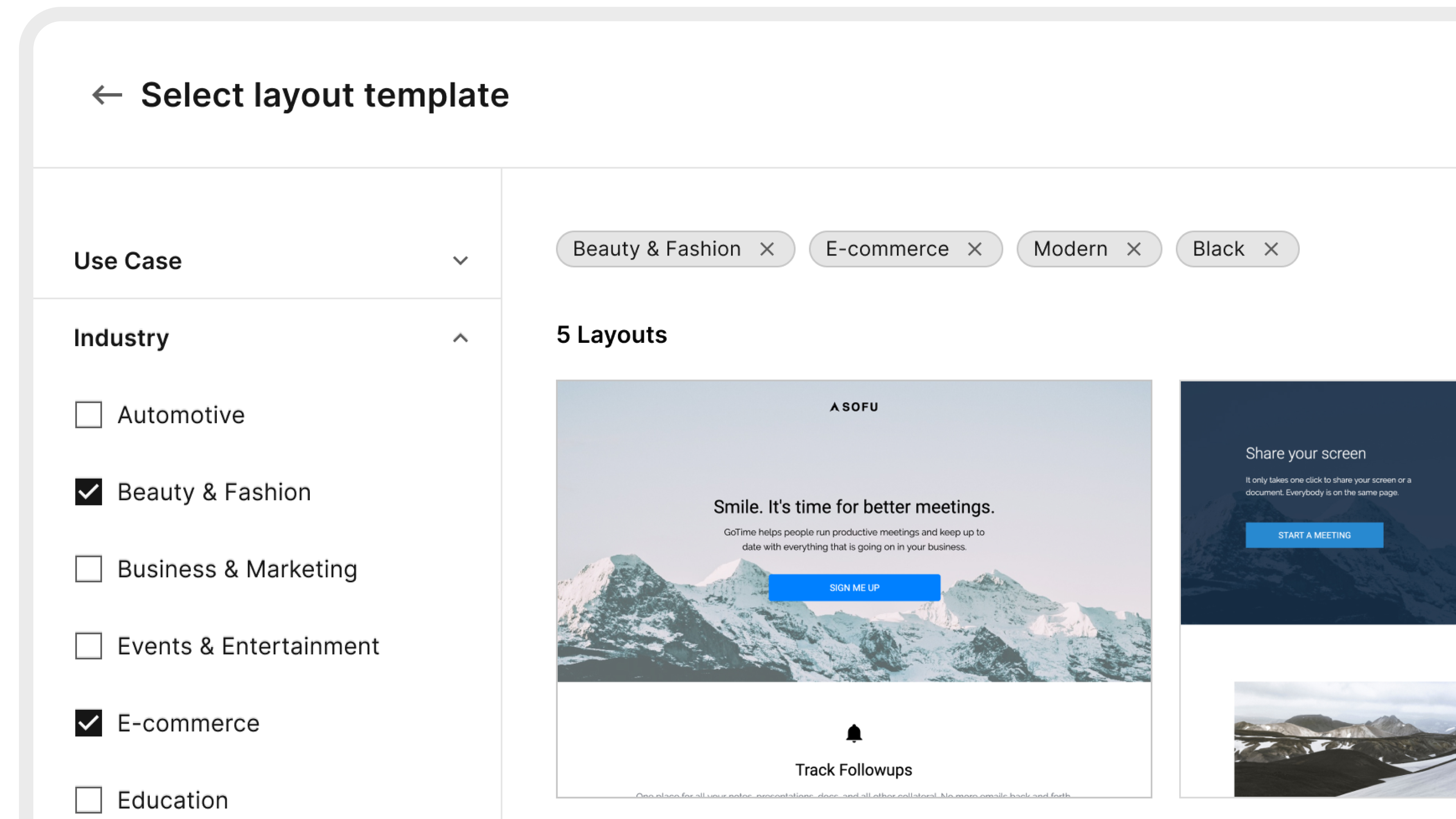
  • A redesigned filtering experience with five filter categories, multi-select functionality, visible selected-filter chips, one-click filter removal, and a "Clear all" option.
  • A curated and consistent template ordering system instead of popularity-based ranking, helping users discover a wider range of templates more naturally.
  • A scalable category structure that kept the browsing experience simple while leaving room for future expansion.
  • Refreshed catalog with the Professional Services team. We reviewed the existing templates, removed outdated and repetitive options, and introduced new visually distinct templates designed for different use cases.
  • A fully tagged template catalog that allowed the content team to update template organization and ordering without engineering support.
  • Sticky filters on return visits, so users could continue browsing with their previous selections already applied.
Known risk · catalog volume

One trade-off we accepted: with 294 templates total — small compared to some competitors — combining several filters at once could leave a user in an empty state with no results. We planned to grow the catalog in future iterations precisely so the filtering system could keep narrowing without running out of templates. The taxonomy was built first; the volume to fill it was a known follow-up.

Design principle

Phase 1 was about doing fewer things, on purpose. A focused catalog with deliberate constraints is a stronger foundation for Phases 2 and 3 than a feature-rich one no one understands.

07 · Shipped

The library, redrawn.

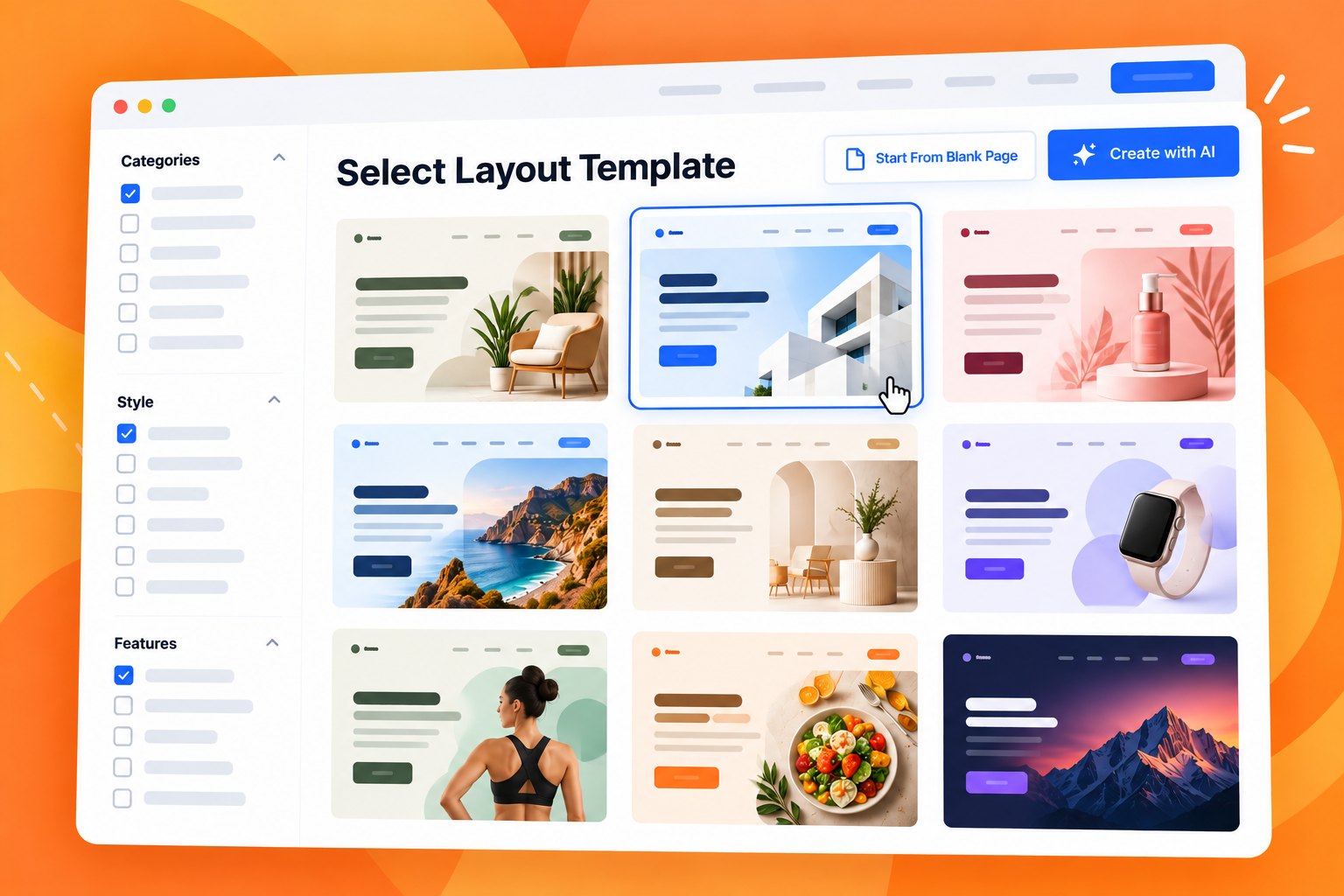
Four pieces of the design are worth seeing — the catalog grid with the new ordering and filter interaction, the filter panel with all five axes, applied tags, and the template preview state.

Fig 01Catalog grid in motion — new ordering, applied filters, and filter interaction
Filter panel showing five axes (Industry, Use Case, Page Type, Color, Style), multi-select within each, two-tier categories, Clear all anchored
Fig 02Filter panel — five axes, multi-select
Active filters surface as removable chip tags above the grid, with one-click removal and Clear all
Fig 03Applied filters — tag bar
Fig 04Template preview — commit moment
08 · Outcome

Templates moved from the long tail to the default path.

To validate the quantitative results, I also reviewed 10 random Hotjar session recordings after launch and manually measured the time between users landing on the template page and opening a template in the editor.

Time spent selecting a template — qualitative sample, post-launch

Before redesigntypical pre-launch session
10–15 mintypical range
After redesign10 random session recordings, last 24h
3–5 mintypical range
~⅔ reduction in time spent selecting a template. The sample is small (n=10) and qualitative — but consistent enough across recordings to triangulate the quantitative shift in the template-led share of page creation.

Two other things moved with the time reduction:

Template-led pages
~3–4×

The percentage of pages created from templates increased by approximately 3–4× versus the pre-launch baseline.

Onboarding funnel
Faster

Users moved through the new-page onboarding funnel faster — fewer drop-offs at the template-selection step, more deliberate first edits.

Headline result

Template selection time fell from 10–15 minutes to 3–5 minutes; template-led page creation moved from ~10% to ~35% of total. The library stopped being a feature buried in the editor and started being the front door of the product — the position the rest of the funnel was waiting for it to occupy.

09 · Reflections

What I'd do differently.

Three things I'd change next time.

  • Tag the existing catalog before re-curating it. We curated and tagged in parallel, which made the "what gets cut" conversation harder than it needed to be. If everything had been tagged first, the cut list would have been obvious from the data.
  • Run a small qualitative study with a synthetic catalog before locking the axes. The five axes worked, but I'd have more confidence in them if I'd validated them on five users with a card-sort plus a prototype, before engineering started building filter logic.
  • Build the empty-state harder. Phase 1 had a "no templates match your filters" state, but it was thin. With the right empty-state copy and one nudge ("clear your color filter — that's the most restrictive one"), the failure mode of an over-narrowed search could become a teaching moment.
Lesson

The work that determines whether a catalog feels good is invisible — it's the taxonomy, the ordering rules, the curation tooling. Visible UI is the last 10% of a project like this, even though it's the part that gets reviewed.

Continue reading